Chapter 5 was about which view SwiftUI thinks it is looking at. This one is about when it bothers to look at all.
Re-running a body is the unit of work in SwiftUI. Everything you care about — smoothness, battery, whether a list scrolls at sixty frames per second — comes down to how many bodies run when something changes. And it is completely invisible. You cannot see a body run, which means you cannot reason about it, which means most people never do.
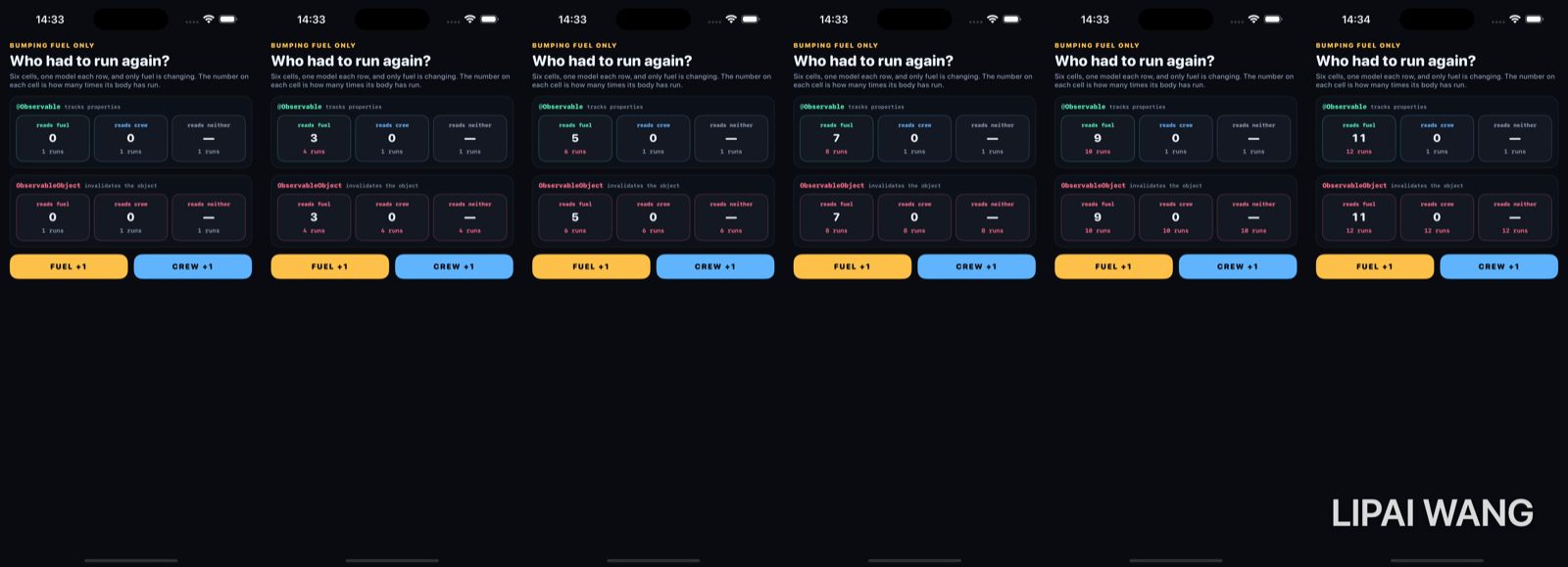
So this bench makes it visible: six cells, each printing how many times its own body has run.
Counting a thing you are not supposed to touch
/// Counts body evaluations for one view identity.
///
/// A reference type, because a body cannot write to its own `@State` — and this
/// has to be written *during* the body evaluation it is counting.
final class BodyCounter {
  private(set) var count = 0
  func bump() { count += 1 }
}
Used like this, at the top of a body:
var body: some View {
  let _ = counter.bump()
  …
}Writing to anything from inside body is exactly what SwiftUI asks you not to do. It works here only because BodyCounter is a plain class SwiftUI knows nothing about, so incrementing it cannot invalidate anything and cannot loop.
Apple's own version of this is let _ = Self._printChanges(), which logs why a body re-ran. Use that in real code; this bench only draws the number on screen so it can be photographed.
Also: these are body evaluations, not frames or renders. SwiftUI may evaluate a body more than once for a single visible update. The absolute numbers are not the point — the comparison between cells in the same screenshot is.
Two models, one difference
/// The modern one. `@Observable` records which properties each view actually
/// *read* while its body ran, and only invalidates the views that read the
/// property that changed.
@Observable
final class Mission {
  var fuel = 0
  var crew = 0
}

/// The one that came before. `objectWillChange` fires for the whole object, so
/// every view holding it is invalidated no matter which property moved — or
/// whether that view reads any property at all.
final class LegacyMission: ObservableObject {
  @Published var fuel = 0
  @Published var crew = 0
}
Both rows get bumped identically. Only fuel ever changes. Here is the start:
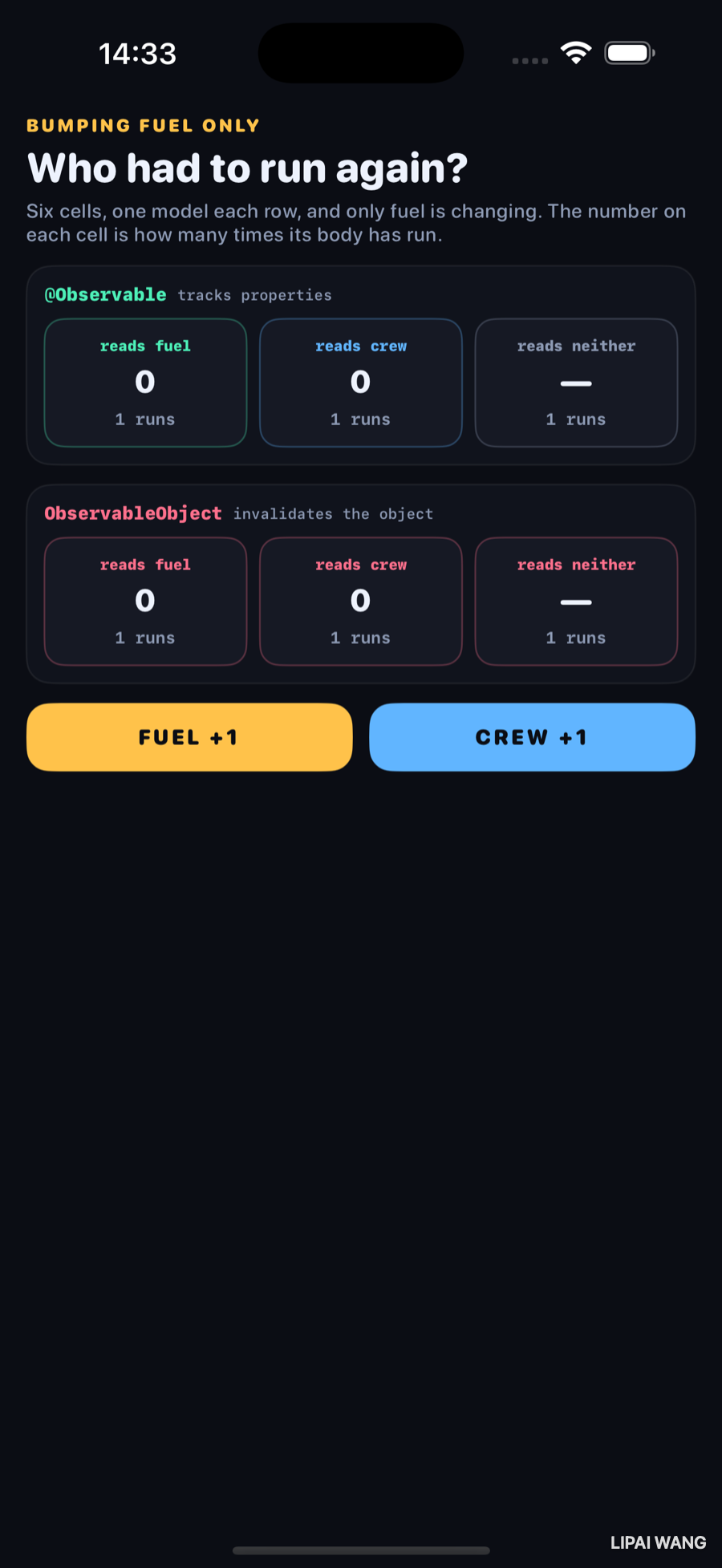
And here is the same screen after nine fuel bumps:
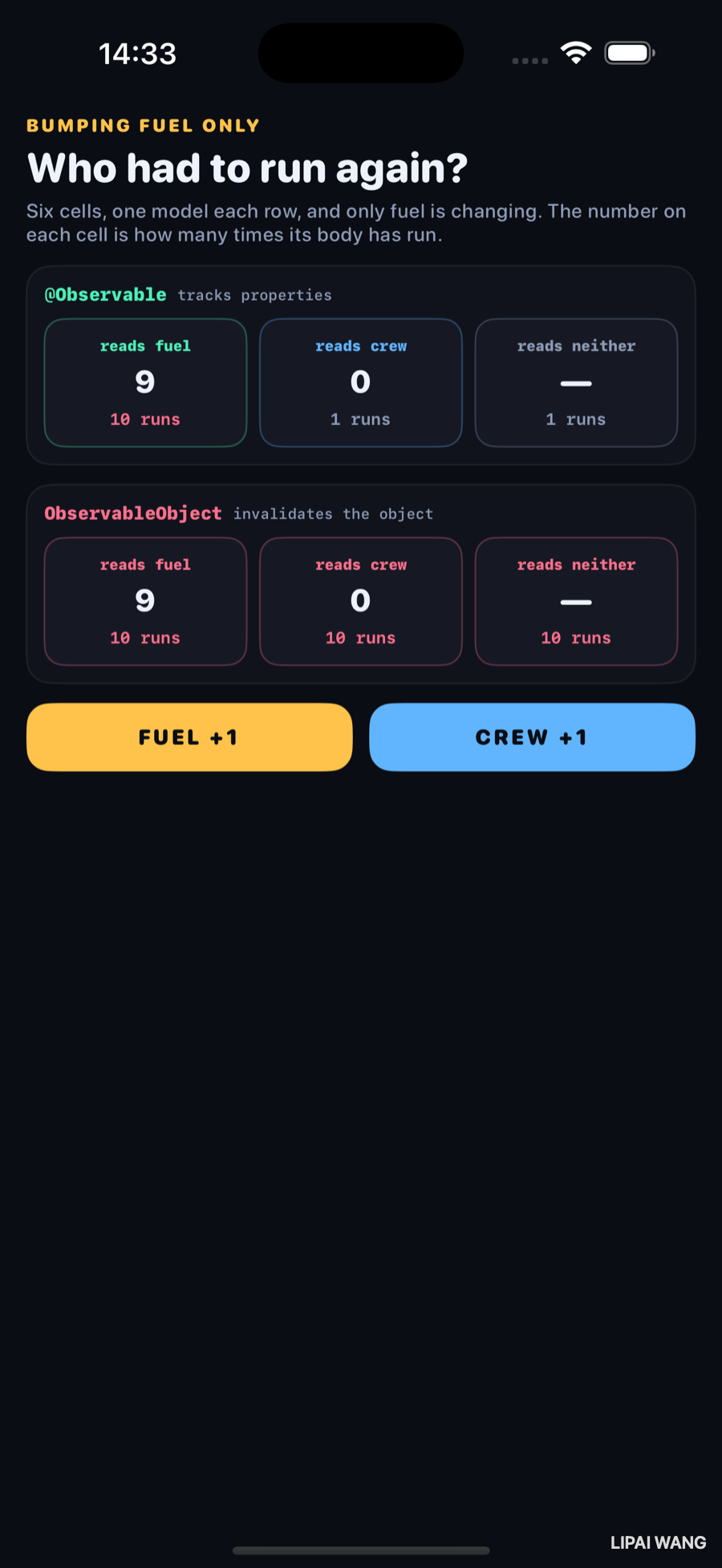
| reads fuel | reads crew | reads neither | |
|---|---|---|---|
@Observable | 10 runs | 1 run | 1 run |
ObservableObject | 10 runs | 10 runs | 10 runs |
Nine changes, and in the modern row two of the three cells never ran again after their first appearance. In the legacy row every cell ran every time — including the one that reads nothing at all.
bodyWhen SwiftUI evaluates a body, it does so inside an observation scope that records every @Observable property touched. That set becomes the view's dependencies. Touch mission.fuel and you depend on fuel — not on Mission.
The corollary catches people out: a read that happens outside a body registers nothing. Pulling values out in init, or into a stored property, means the view has no dependencies and will not update when they change.
ObservableObject has no such information. @Published fires objectWillChange, every subscriber is invalidated, and the subscription is to the object. Which property moved, and which properties a given view reads, are questions the mechanism cannot ask.
Mini-exercise
Tap CREW +1 instead. In the modern row only the crew cell moves. In the legacy row all three move again. Then tap them alternately and watch the legacy row's counters run at exactly double the rate of the modern row's — a real, measurable cost for the same user-visible behaviour.
The two mistakes that erased the difference
The first build of this bench produced a much less interesting screenshot. The legacy row behaved as expected, but in the @Observable row the crew and "reads neither" cells were also climbing — about half as fast, but climbing. Two mistakes, both mine, both worth more than the demo itself.
@StateObject in the parent subscribes the parent
@StateObject private var legacy = LegacyMission()   // ← the whole screen re-runs
@State       private var legacy = LegacyMission()   // ← just holds it
@StateObject is not storage — it is storage plus a subscription. The parent held the legacy model that way, so every legacy bump invalidated the parent, which rebuilt the entire screen, including all six cells.
@State holding a class instance keeps it just as stably and subscribes to nothing. Ownership and observation are separate decisions, and the property wrappers make them look like one.
A view that owns a model and passes it down will re-render on every change to it — so everything below it is at the mercy of whatever the parent diffing can prove. Push the subscription as far down the tree as you can: let the leaf that reads fuel be the thing that observes fuel. That is the entire performance argument for @Observable, and it only pays off if you do not accidentally subscribe higher up.
A closure in a view defeats diffing
This one is subtler and cost me longer. The cells originally took a closure:
ModernCell(label: "reads fuel", tint: Lab.mint) { $0.fuel }Elegant, and fatal. When a parent re-runs, SwiftUI compares the new child struct against the old one to decide whether the child's body needs to run. A closure can never be proven equal. So a view holding one is re-run every single time its parent is, no matter how precise the observation underneath it is.
The fix was to store something comparable:
/// What a cell reads. Deliberately an enum rather than a closure: SwiftUI
/// decides whether to skip a child by comparing its stored properties, and a
/// closure can never be proven equal — so a cell carrying one re-runs whenever
/// its parent does, no matter how precise the observation underneath is.
enum Reads {
  case fuel, crew, neither
}
With both fixed, the crew and "reads neither" cells dropped from ten runs to one.
Every Button(action:), every onTap handler passed down as a parameter, every "configure this row" closure. They are not wrong — most are cheap and unavoidable. But a view that stores a closure has opted out of diffing, so it belongs on cheap leaf views and not wrapped around an expensive subtree.
If a subtree is expensive and its inputs really are unchanged, EquatableView — or conforming the view to Equatable and writing == yourself — lets you assert what SwiftUI cannot infer.
Which wrapper, and why
@State— this view owns this value. For a value type it is the value; for a class instance it is just stable storage with no subscription. Private by default, and it should stay that way.@Binding— someone else owns it, this view reads and writes it. A two-way reference to a source of truth, not a copy.@Observable+ plain property — the model is a class and the view observes only the properties it reads. The default for anything shared.@Environment(Type.self)— the same, injected implicitly rather than passed through every intermediate view. This bench uses it, which is why the cells take no model parameter at all.@ObservedObject/@StateObject/@EnvironmentObject— the previous generation. Still everywhere, still correct, and object-granular. Worth reading fluently; not worth writing new.
Every one of these answers the same question: who owns this? Exactly one place should. Everything else borrows a reference to it — @Binding for values, the observed object for models. Two copies of a value that are supposed to agree is not a data-flow pattern; it is a bug you have not hit yet.
Challenges
-
Add a seventh cell that reads
mission.fuelin itsinitand stores it in a plain property. Bump fuel. The counter stays at one and the number on screen never updates — a dependency you did not register looks exactly like a view that is working fine until it is not. -
Put the closure back on one modern cell only, and leave the enum on its neighbour. One climbs, one does not, side by side, with everything else identical.
-
Measure a real list. Drop
let _ = Self._printChanges()into a row of a list in a project you already have, scroll, and read the console. The output names what changed, which is usually more surprising than how often. -
Make the "neither" cell honest. Have it read
mission.fuelbut discard the result. It re-runs — proving the dependency comes from the read, not from displaying anything. -
Convert one legacy model. Take an
ObservableObjectfrom your own code, make it@Observable, delete every@Published, and change@StateObjectto@Stateand@ObservedObjectto a plainlet. Count the diff. It is usually smaller than expected and removes more code than it adds.
Key Points
- A body run is the unit of work, and it is invisible — so measure it.
Self._printChanges()in real code; a counter on screen when you need a picture. @Observabletracks property reads duringbody. Touchmission.fueland you depend onfuel, not onMission. A read outside a body registers nothing.ObservableObjectis object-granular.objectWillChangeinvalidates every subscriber regardless of which property changed or what that view reads.@StateObjectis storage plus a subscription. Holding a model that way in a parent re-renders the entire subtree;@Stateholds a class just as stably without subscribing.- Push observation down. The leaf that reads the property should be the thing that observes it — that is the whole performance argument, and it is lost the moment something higher up subscribes.
- A stored closure opts a view out of diffing, because closures can never be proven equal. Fine on cheap leaves; expensive wrapped around a big subtree.
EquatableViewis the escape hatch. - One source of truth, borrowed downward with
@Bindingor an observed reference — never copied.
Six chapters, and the Lab has now covered how motion works, what it is built on, and what makes it run. The next bench turns outward to something with no SwiftUI in it at all: the layout system underneath everything, and the negotiation between a parent that offers space and a child that decides what to do with it.
Read next
Ship your apps faster
When you're ready to publish your Swift app to the App Store, Simple App Shipper handles metadata, screenshots, TestFlight, and submissions — all in one place.
Try Simple App Shipper