Four chapters of motion, and every one of them quietly depended on something none of them mentioned.
An animation continues instead of restarting because SwiftUI decided the view before and the view after were the same view. A transition fires because it decided they were different views. A matched pair links up because two frames belong to one identity. Get that decision wrong and nothing in the previous four chapters works, in ways that look like animation bugs and are not.
This chapter is about the decision itself.
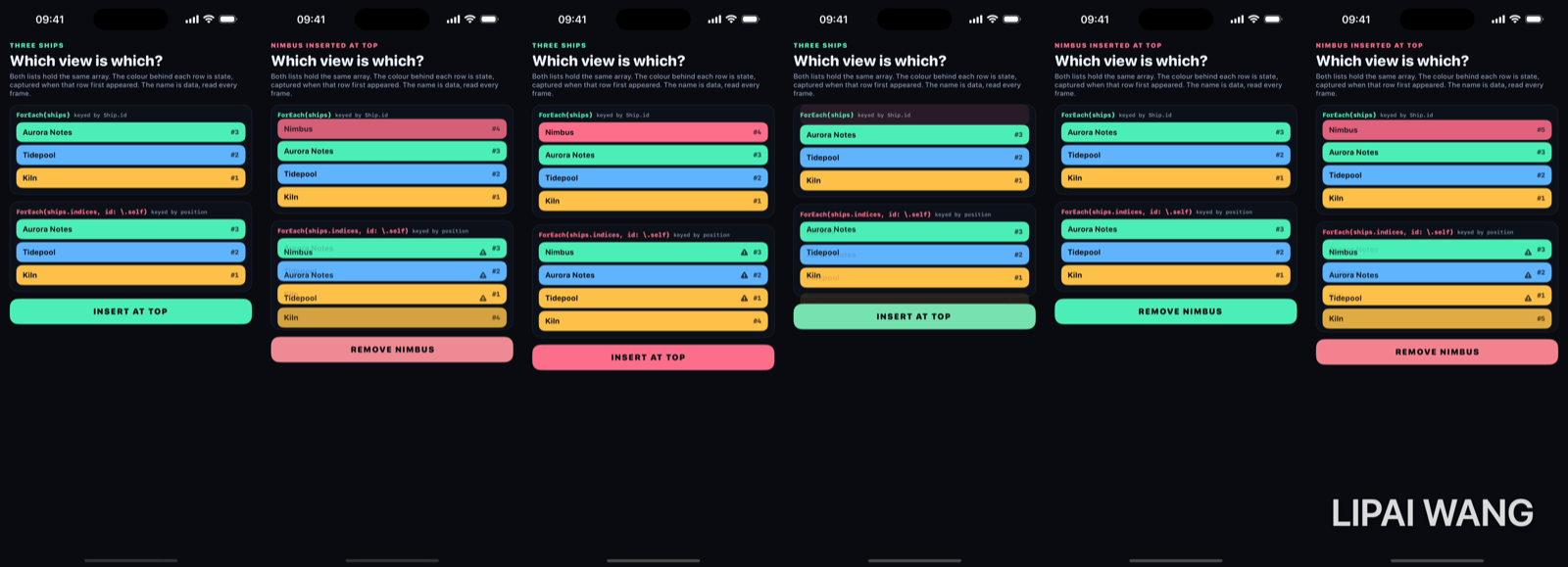
The setup, and why it is readable
Two lists. The same array. The only difference is one argument.
// Identity travels with the data.
ForEach(ships) { ship in
  IdentityRow(ship: ship, stamper: stableStamper)
}

// Identity belongs to the slot.
ForEach(ships.indices, id: \.self) { index in
  IdentityRow(ship: ships[index], stamper: indexStamper)
}
Each row displays two things that come from opposite places:
/// `ship` is *data* — re-read on every render. `capturedTint` and `stamp` are
/// *state*, written once when this view identity first appeared and never
/// touched again. When the name and the colour disagree, you are looking at a
/// view that SwiftUI kept and re-pointed at a different model.
private struct IdentityRow: View {
  let ship: Ship                        // data

  @State private var capturedTint: Color?   // state
  @State private var stamp: Int?

  var body: some View {
    HStack { Text(ship.name); Spacer(); Text("#\(stamp ?? 0)") }
      .background(capturedTint ?? Lab.dim)
      .onAppear {
        guard capturedTint == nil else { return }
        capturedTint = ship.tint
        stamp = stamper.take()
      }
  }
}
The name is read fresh every render. The colour and the number are written once, the first time that view identity appears, and never again. So a row where the name and the colour disagree is a row whose view outlived the data it was created for.
At rest, both lists agree completely:
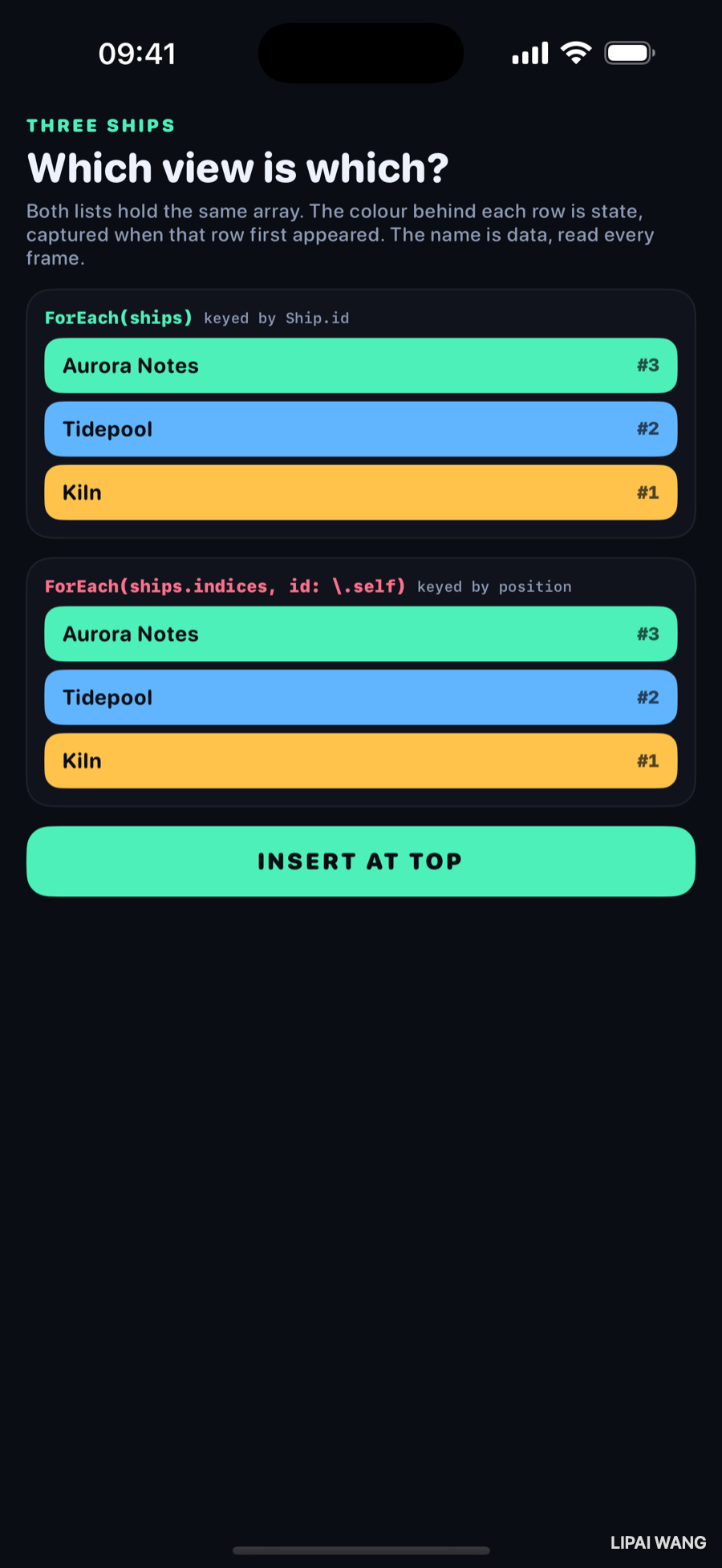
Insert one row at the top
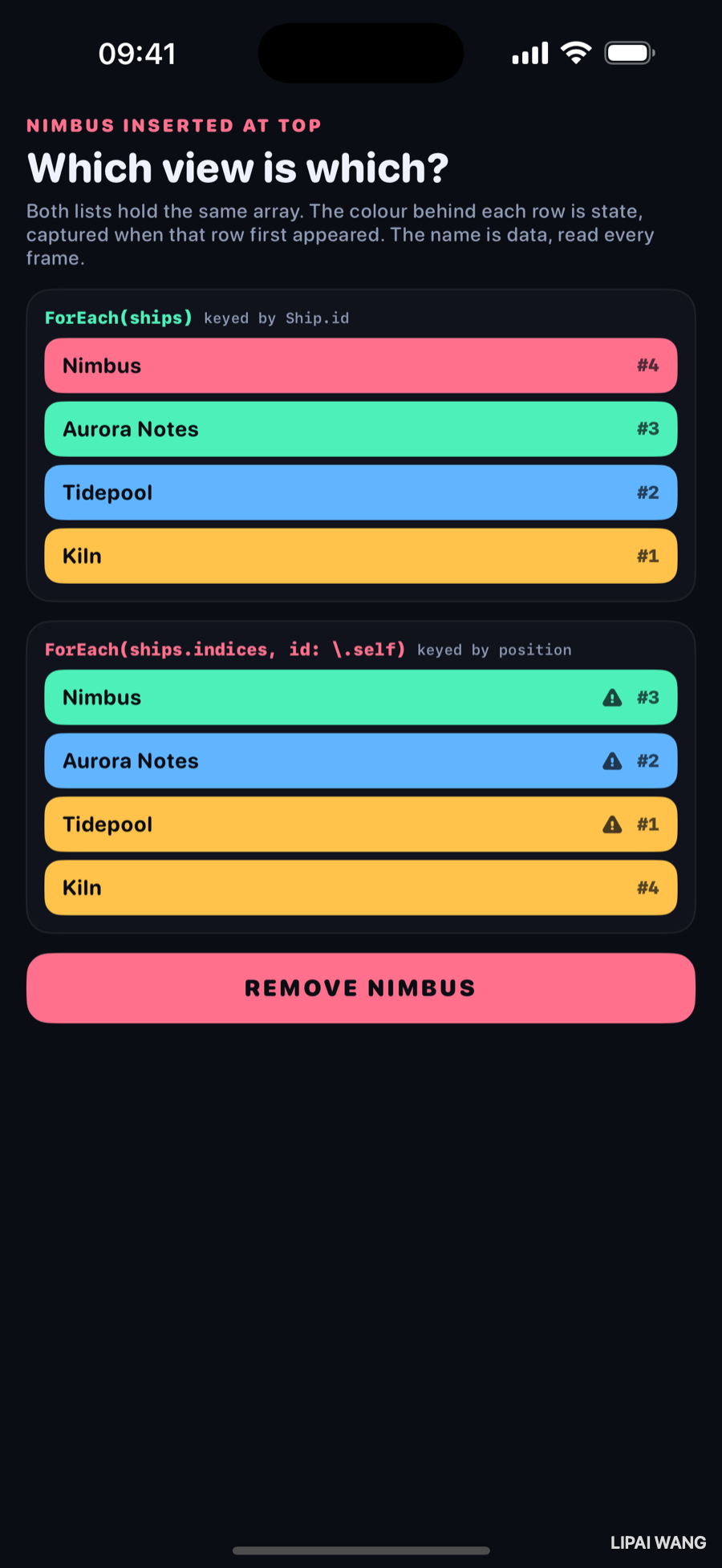
Top list, keyed by Ship.id. Nimbus arrives on its own pink with a brand-new serial. Aurora, Tidepool and Kiln keep their colours and their original numbers. Three views survived; one was created.
Bottom list, keyed by index. Three warning triangles. Nimbus is sitting on Aurora's green. Aurora is on Tidepool's blue. Tidepool is on Kiln's amber. Every row is wearing the state of the row that used to be one position further up.
Index 0 was already on screen and is still index 0, so SwiftUI kept that view — and kept its @State. It simply pointed it at a different Ship. Same for 1 and 2. Only index 3 did not exist before, so only index 3 is genuinely new.
The list is not "re-ordering badly". It is doing precisely what you asked: you told it that identity means position.
Read the serial numbers on the bottom list and the story is complete: #3, #2, #1, then #4. The first three are the original three views, still in their original slots. The #4 is the one new identity, and it landed at the bottom — as far as possible from where the new data actually went.
Mini-exercise
Predict what happens if you remove the first row instead of inserting one, then run it. In the id-keyed list one view is destroyed and two survive. In the index-keyed list the last slot is destroyed and every surviving row inherits data from the row below it. Same mechanism, opposite direction, equally wrong.
The two kinds of identity
SwiftUI has exactly two ways to tell views apart.
Structural identity is a view's position in the view tree. You never write it down; it comes from the shape of your code. This is why the two branches of an if are different identities:
if isCompact {
  ShipCard(ship: ship)     // one identity
} else {
  ShipCard(ship: ship)     // a different identity
}
Two ShipCards of the same type with the same data, and SwiftUI considers them unrelated. Flip isCompact and the first is destroyed, its @State discarded, and the second is created from scratch — with a transition, because to SwiftUI one view left and another arrived. The fix, when you want continuity, is one view with a varying modifier rather than two views in two branches.
Explicit identity is when you say it out loud — the id: in a ForEach, or the .id(_:) modifier. That is what this bench manipulates.
@State belongs to the identity, not to the structA View struct is created and thrown away constantly — many times per second during an animation. The @State it declares does not live in the struct; it lives in storage SwiftUI keeps alongside that view's identity.
That is the whole reason this chapter matters. "Which identity" decides where your state lives, so getting it wrong does not corrupt your data — it hands the right state to the wrong view.
How to key a ForEach, in order of preference
Conform to Identifiable. One requirement — an id property that is Hashable — and ForEach(ships) needs no id: argument at all. This is the default you should reach for.
struct Ship: Identifiable, Equatable {
  let id: String
  let name: String
  let tint: Color
}
Pass a stable key path when you cannot conform the type: ForEach(ships, id: \.registration). Same guarantee, spelled at the call site.
id: \.self works if the element itself is Hashable — fine for a set of enum cases or a fixed list of strings. It has a sharp edge: two equal elements are one identity. A list with a duplicate silently renders fewer rows than you have data, which is a bewildering bug the first time you meet it.
id: \.self over indices is the one in the bottom panel, and it is the one to be suspicious of. It is not always wrong — for a collection that never inserts, removes or reorders, position is a stable identity, and indexing is sometimes the only way to get a Binding. But the moment the collection can change shape, you have told SwiftUI that the fourth row is always the fourth row, and it will believe you.
UUID() per renderForEach(ships, id: \.self.freshID) // computed as UUID() each timeEvery render produces new ids, so every render destroys every view and builds new ones. @State resets constantly, transitions fire on every update, animations restart from zero, and scroll position jumps. It looks like a rendering bug and it is an identity bug.
UUID() is a fine id — assigned once, when the model is created, and stored. It is never a fine id computed in a view's body.
.id() as a deliberate reset switch
Everything above treats an identity change as a hazard. It is also a tool.
DraftForm(release: release)
  .id(release.id)
Now switching releases genuinely replaces the form: every @State inside it — half-typed fields, expanded sections, scroll position — is discarded, because that is a different view now. Without the .id(), the same form view would persist and quietly show the previous release's half-finished edits.
That is the honest summary of the modifier: .id() means "when this value changes, throw this view away and build a new one." It is the right answer for a reset, and a performance disaster if the value changes often.
What this explains about the last four chapters
- Chapter 2's transitions only fire on insertion and removal — which is to say, when an identity appears or disappears. A view whose identity persists never transitions, however much its content changes. That is why the container-wrapping trap worked the way it did: wrapping changed which identity was arriving.
- Chapter 3's
matchedGeometryEffectlinks two identities under one name. The jitter when both halves are sources is one name claiming two identities; the silent failure with two namespaces is one name in two separate registries. - Chapter 1's animations continue smoothly because the view kept its identity across the change. Give an animating view a
.id()that changes and the animation restarts from the new starting point every time, which looks exactly like a broken easing curve. - Chapter 4's shapes are the exception that proves it: a shape has no
@Stateand no identity concerns, which is precisely why its animation problem was a pure maths problem.
Challenges
-
Reorder instead of inserting. Swap the first two ships. The id-keyed list moves two rows; the index-keyed list moves nothing and swaps two names. Watch which one you would rather debug at 2am.
-
Give the rows a text field. Add a
TextFieldbound to per-row@StatetoIdentityRow, type something into the second row, then insert at the top. In one list your typing follows the ship; in the other it stays in the slot. -
Break it with a duplicate. Add a second ship with the same
idto the stable list. Note that the failure is not a crash or a warning — it is a row that does not appear. -
Use
.id()on purpose. Wrap the index-keyed list in.id(ships.count)so the whole list is rebuilt whenever the count changes. The mismatch disappears — and so does every animation, because now nothing survives to animate. That trade is worth feeling. -
Find one in your own code. Search for
indices,enumerated(), andid: \.selfin a project you already ship. Not all of them are bugs. Work out, for each, whether that collection can ever change shape.
Key Points
- Identity is how SwiftUI decides two renders are the same view — and therefore what animates, what transitions, and where
@Statelives. @Statebelongs to the identity, not the struct. View structs are rebuilt constantly; the storage beside their identity is not.- Structural identity comes from your code's shape. Two branches of an
ifare two identities even when they hold the same view with the same data. - Explicit identity is
ForEach'sid:and the.id()modifier. PreferIdentifiable; fall back to a stable key path. - Keying by index binds identity to position. Insert, remove or reorder, and views stay in their slots while the data slides underneath — state lands on the wrong row and transitions fire on the wrong one.
id: \.selfcollapses duplicates into one identity, so a duplicated element silently renders one row instead of two.- A
UUID()computed in a body is a new identity every render — constant state resets and restarting animations, wearing the costume of a rendering bug. .id()means "throw this view away and rebuild it." Exactly right for resetting a form; expensive if the value changes often.
Five chapters in, the Lab has covered how motion works and what it is built on. The next bench turns to the other half of every animated interface — the one that decides when things change rather than how: state, bindings, and the observation system that decides which views get to hear about a change at all.
Read next
Ship your apps faster
When you're ready to publish your Swift app to the App Store, Simple App Shipper handles metadata, screenshots, TestFlight, and submissions — all in one place.
Try Simple App Shipper