What does a screen draw before the data arrives?
Most shipping UIs answer with a shrug: they only know how to draw the happy path. While the network is in flight, while the list comes back empty, while App Store Connect returns a 409 — the view that only checks for .loaded draws nothing useful. The bug does not look like a crash. It looks like a quiet dash.
So this bench puts that shrug next to a panel that refuses it.
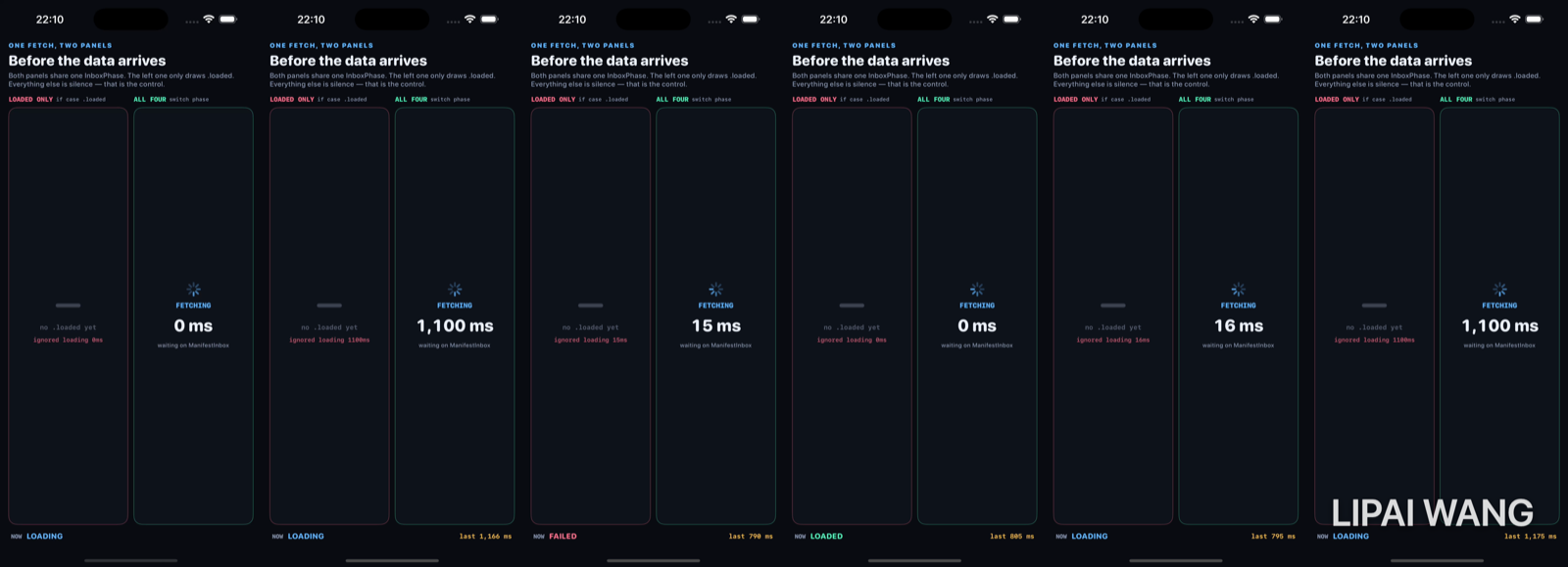
One phase, two panels
Both columns read the same InboxPhase. That is the whole experiment. The fetch is fake — ManifestInbox.fetch sleeps, then returns — but the phase value is real shared state, and both panels re-render from it.
enum InboxPhase: Equatable {
  case loading(elapsedMs: Int)
  case empty
  case failed(String)
  case loaded([ManifestRow])
}
Four cases. Not two. A boolean isLoading cannot express "the server answered and there is nothing to show," and it cannot carry the error string a retry button needs. The phase is the UI contract.
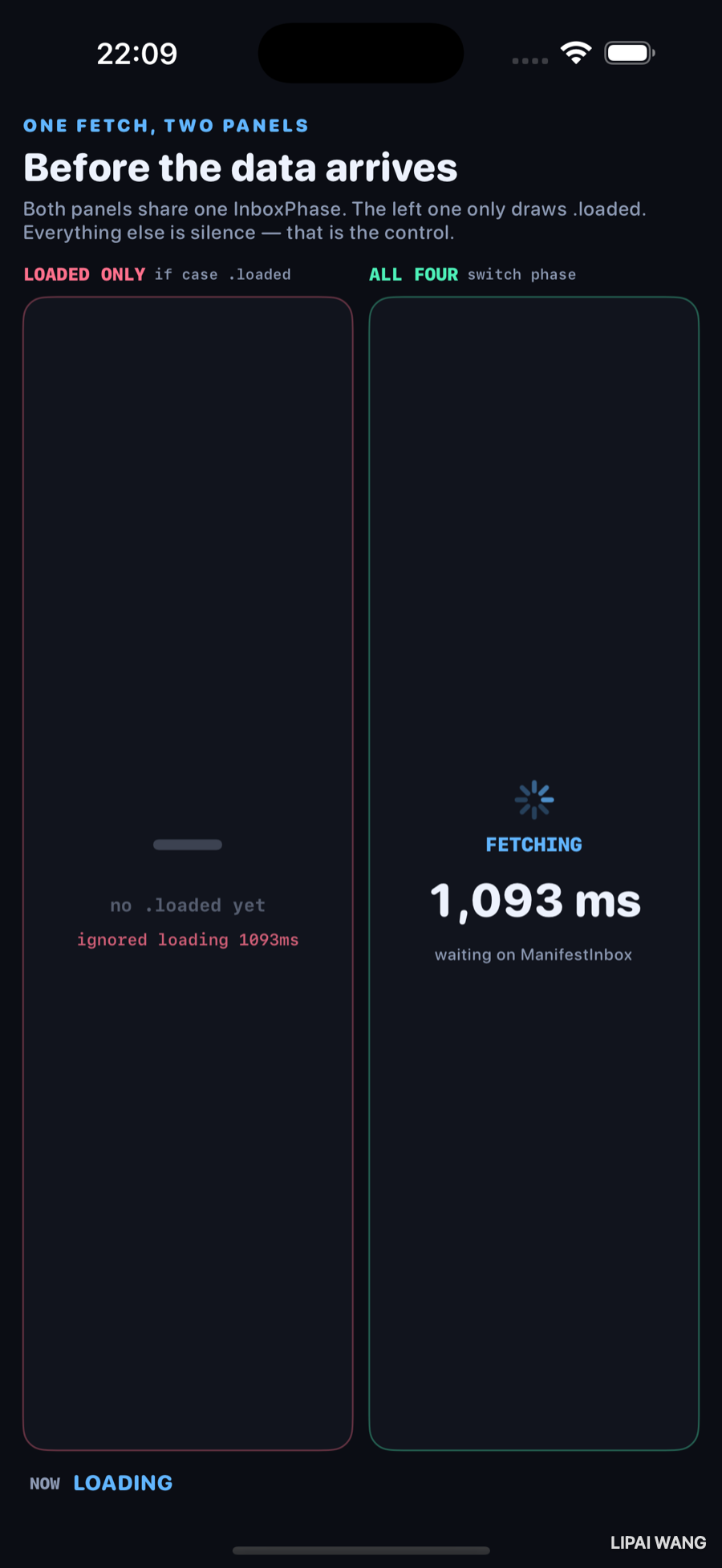
At 1,093 ms into a pinned loading run, the right panel is honest: spinner, FETCHING, the live counter. The left panel — the control — prints ignored loading 1093ms under a dash. Same phase. One branch.
The control: if case .loaded
/// The broken version. One `if case`, no else branch worth designing.
private struct LoadedOnlyPanel: View {
  let phase: InboxPhase

  var body: some View {
    Group {
      if case .loaded(let rows) = phase {
        ManifestList(rows: rows, tint: Lab.rose)
      } else {
        // Silence. No spinner, no empty copy, no error text.
        VStack(spacing: 8) {
          Text("—")
          Text("no .loaded yet")
          Text(phaseLabel) // "ignored loading…", "ignored empty", …
        }
      }
    }
  }
}When the phase finally becomes .loaded, both panels draw the same three rows. That is not a coincidence and it is not a bug in the demo — it is why happy-path-only UIs ship. Reviewers open the screen after the data is warm. The dash never appears in the screenshot they approve.
Empty is the one nobody designs
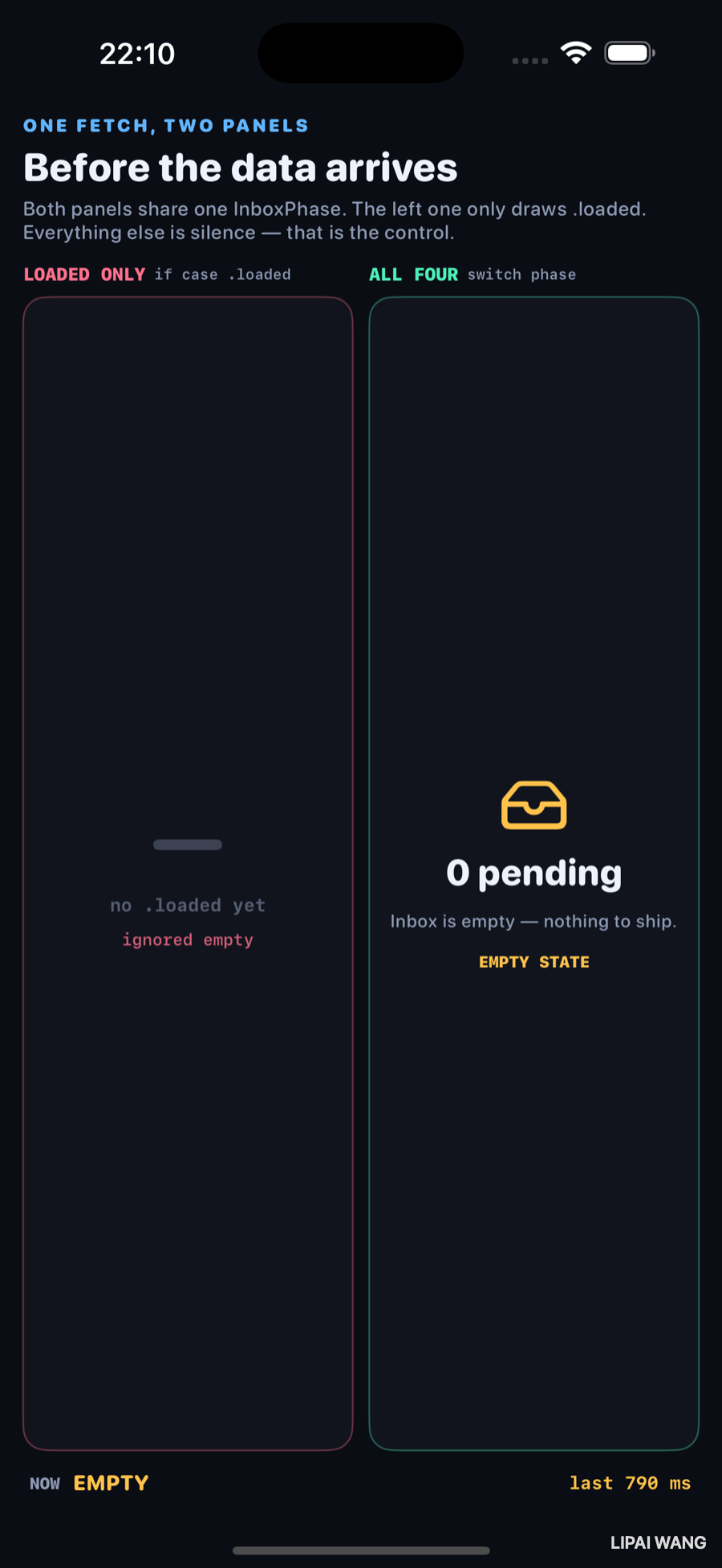
The empty reply resolved in 790 ms. The right panel does not pretend this is still loading, and it does not reuse the loaded list chrome with zero rows. It says 0 pending — an empty inbox is a destination, not a missing spinner.
The left panel labels itself ignored empty. That is the whole product failure mode: a successful round trip that the UI has no vocabulary for.
Loading means "we do not know yet." Empty means "we know, and the answer is zero." Collapsing them into one spinner trains users to wait forever for a list that will never grow. The bench forces the distinction by making empty a separate InboxPhase case with its own chrome.
Failed carries a string, or it is useless
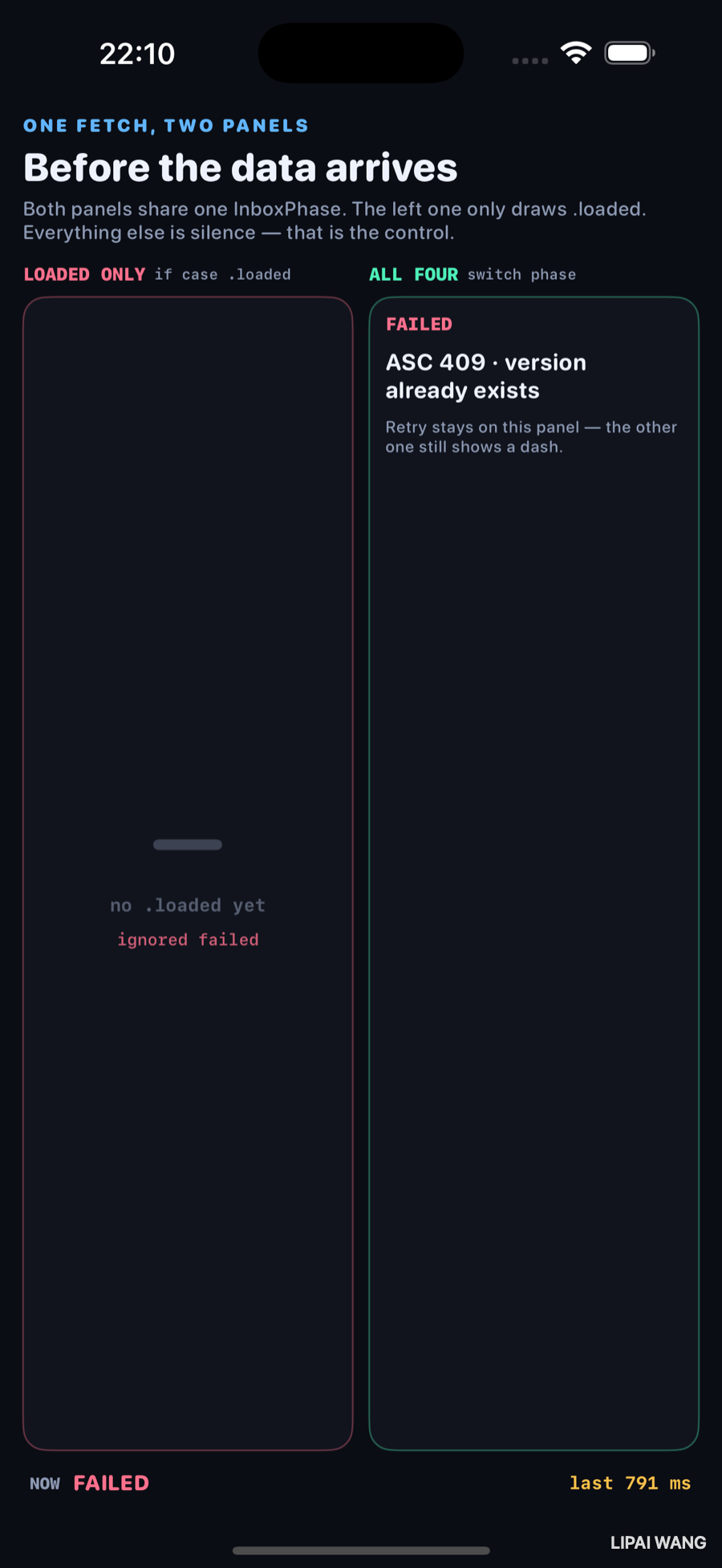
791 ms later the forced failure lands: ASC 409 · version already exists. The right panel keeps the message on screen — retry belongs here, next to the reason. The left panel still has a dash. A user facing that dash has nothing to report but "it didn't work."
case .failed:
  return .failed("ASC 409 · version already exists")
Throwing from async is how the modern concurrency model surfaces this — try await either yields a value or an error you must handle. Mapping that error into a phase case is what turns a compiler-checked throw into something a view can draw.
Loaded: both panels finally agree
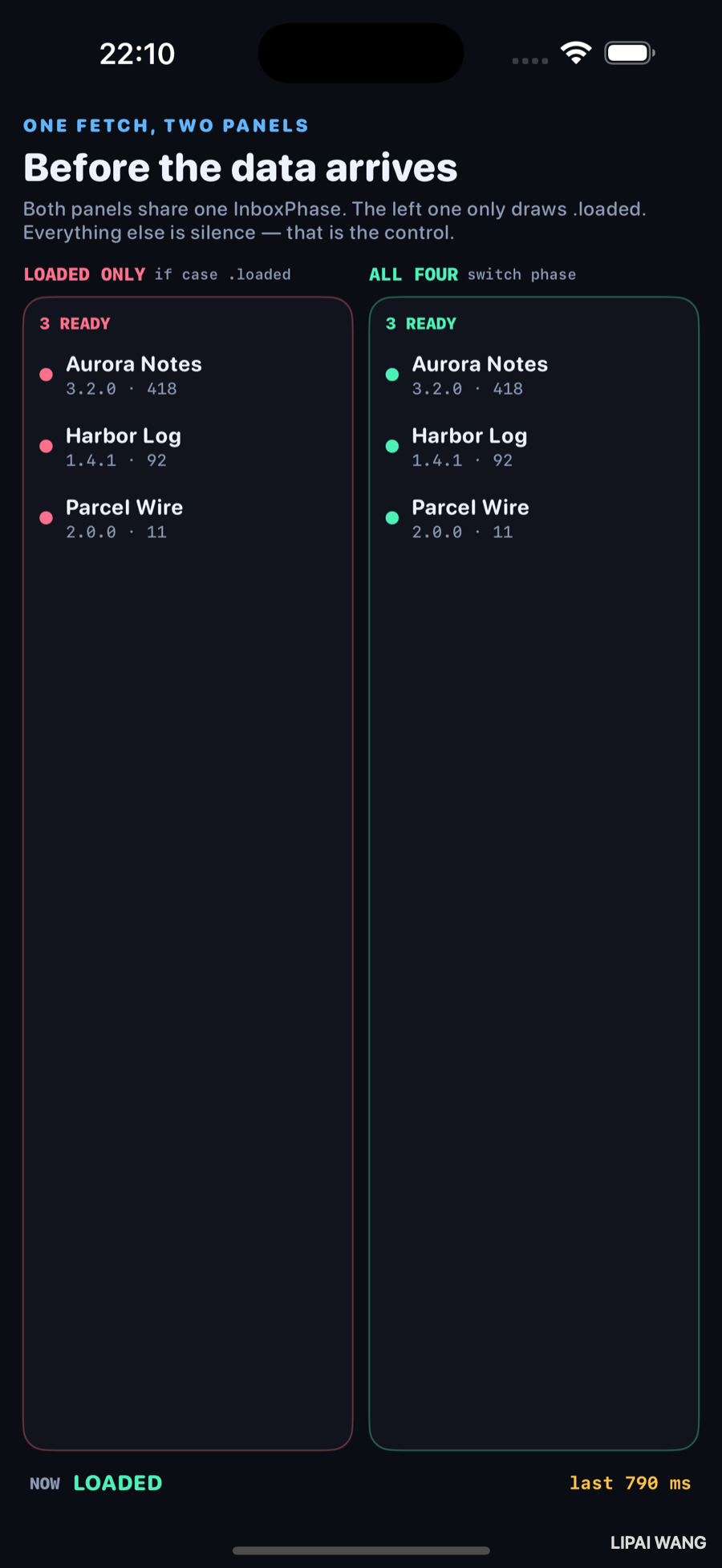
790 ms of fake latency, then three rows on both sides:
| App | Build |
|---|---|
| Aurora Notes | 3.2.0 · 418 |
| Harbor Log | 1.4.1 · 92 |
| Parcel Wire | 2.0.0 · 11 |
Rose on the left, mint on the right — same data. The control was never incapable of drawing a list. It was incapable of drawing anything else.
What went wrong while building this
The first capture plan recorded in -slowmo with an eight-to-twelve-second loading scenario at the front of the cycle. The filmstrip came back as six frames of spinner and nothing else. Empty, failed, and loaded never appeared in the strip — not because the code was wrong, but because the loading beat ate the entire recording window.
That is why ManifestInbox.fetch now branches:
case .loading:
  if pinnedLoading {
    seconds = LabLaunchOptions.slowMotion ? 12 : 8  // stills need time
  } else {
    seconds = LabLaunchOptions.slowMotion ? 2.2 : 1.1  // cycles must finish
  }
Pinned -mode loading stays in flight long enough to photograph 1,093 ms. The free-running cycle keeps loading short so a twelve-second recording can actually reach the other three states. The chapter only exists because the first filmstrip contradicted the plan.
Task on the main actor, with a generation tokenEach scenario bump increments fetchGeneration. The ticker that writes loading(elapsedMs:) and the final phase assignment both bail if a newer fetch has started. Without that, a slow scenario finishing after a fast one can paint a stale empty over a fresh loaded list — a race the happy-path panel would also hide behind a dash.
The switch that earns the mint border
private struct AllFourPanel: View {
  let phase: InboxPhase

  var body: some View {
    switch phase {
    case .loading(let ms):
      // ProgressView + "FETCHING" + "\(ms) ms"
    case .empty:
      // tray + "0 pending" + EMPTY STATE
    case .failed(let message):
      // FAILED + the real string
    case .loaded(let rows):
      ManifestList(rows: rows, tint: Lab.mint)
    }
  }
}
Exhaustive switch is not style. It is the compiler refusing to let you ship a fifth state you forgot to draw — the same pressure async throws puts on the fetch side.
Mini-exercise
In LoadedOnlyPanel, change the else branch to always show ProgressView() regardless of phase. Run the empty scenario (-mode empty). You will see a spinner forever on a fetch that already finished in ~790 ms — proof that "always show loading chrome" is not a substitute for an empty case.
Challenges
- Drive the same two panels from a real
URLSessioncall that can 404, and mapHTTPURLResponse.statusCodeinto.failedwithout inventing a parallelerrorMessage: String?beside arows: [Row]array. - Add a fifth phase —
.stale(rows)— for cached rows shown while a refresh is in flight. Watch the exhaustiveswitchforce every call site to decide what "stale" looks like. - Cancel the in-flight
Taskwhen the bench disappears and assert the generation token prevents a late.loadedfrom painting after teardown. - Replace the live millisecond label with a determinate progress value from
AsyncSequencebyte counts — keep the control panel unchanged and photograph the difference again. - Write an XCUITest that fails if the
LOADED ONLYpanel ever exposes an accessibility element during.emptyor.failed(it should stay silent; that silence is the bug).
Key Points
- A screen that fetches has four jobs to draw: loading, empty, failed, loaded — not "spinner then list."
- Share one phase value across panels so the control comparison is about rendering, not about divergent data.
if case .loadedis how happy-path UIs ship; they look correct in the one state reviewers see.- Empty is a successful answer of zero, not a slow load — 0 pending at 790 ms in this bench.
- Failed must carry a string (here
ASC 409 · version already existsat **791 ms`) or retry is theatre. - Mid-flight evidence: 1,093 ms on the pinned loading still; both counters matched across the control label and the mint panel.
- Exhaustive
switchon the phase is the UI half ofasync throws— forgotten cases become compile errors. - Capture plans lie until you watch the filmstrip; an oversized loading beat produced six spinner frames and forced the latency split between pinned and cycling runs.
Next up: cancellation — two lists that fetch on appear, one wired with .task (cancels on disappear) and one with .onAppear { Task { … } } (does not). Navigate away and back, and only one work counter climbs.
Read next
Ship your apps faster
When you're ready to publish your Swift app to the App Store, Simple App Shipper handles metadata, screenshots, TestFlight, and submissions — all in one place.
Try Simple App Shipper