You tapped Back. Did the work stop?
Chapter 9 was about what a screen draws before data arrives. This one is about what keeps running after the screen is gone. The answer is not in the network layer. It is in how the Task was started.
Same loop, two lifetimes
Both lanes do the same thing: add one to a counter every 100 ms. The only difference is how the work is attached to the view.
// Mint — structured. SwiftUI owns this task.
.task(id: visit) {
  while !Task.isCancelled {
    ticks += 1
    try await Task.sleep(nanoseconds: 100_000_000)
  }
}

// Rose — unstructured. You own this task, and this bench refuses to cancel it.
.onAppear {
  workers += 1
  Task {
    while true {
      ticks += 1
      try? await Task.sleep(nanoseconds: 100_000_000)
    }
  }
}
The parent toggles hosted on a timer so capture does not need a Back tap. When hosted becomes false, both lanes leave the hierarchy together. That is the experiment.
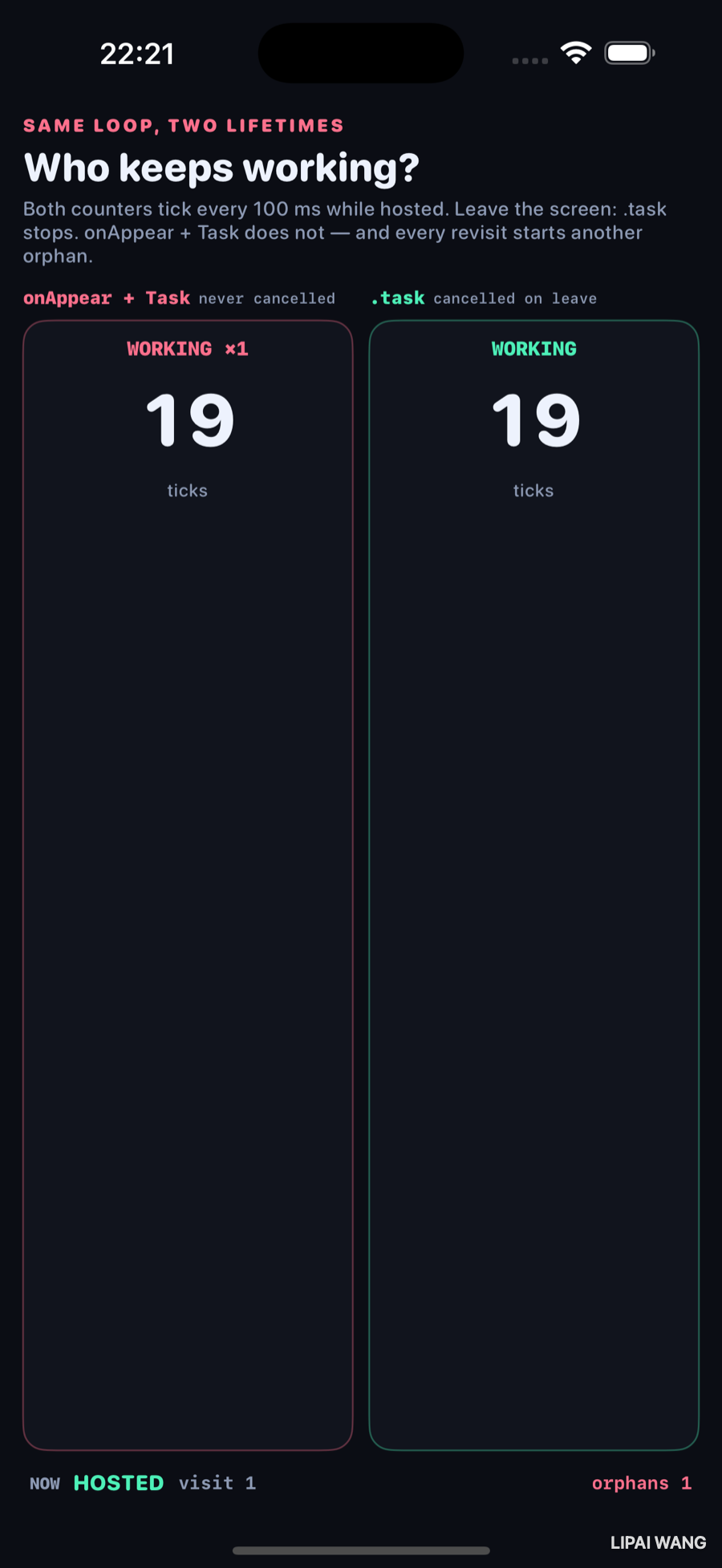
At visit 1, while still hosted, both counters read 19. They really are the same loop. The footer already says orphans 1 — the rose worker is counted the moment it starts, because nothing will ever tear it down.
Leave once
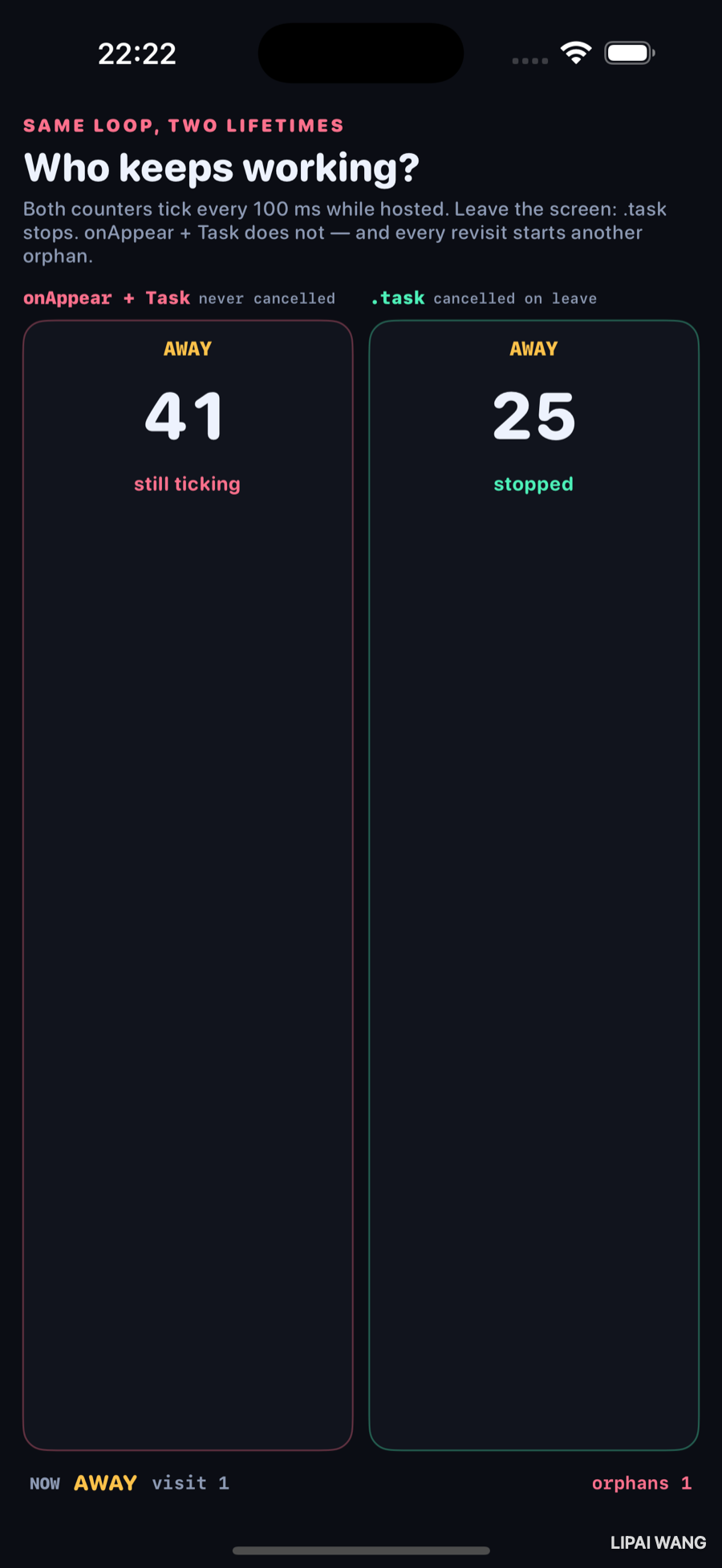
One away beat later:
| Lane | Ticks | Label |
|---|---|---|
onAppear + Task | 41 | still ticking |
.task | 25 | stopped |
Mint froze at the leave. Rose kept the 100 ms metronome going in the dark — 16 extra ticks with nobody watching. That gap is the whole chapter.
.task is not sugar for onAppear { Task { } }The modifiers look interchangeable in a code review. They are not. .task ties the unstructured unit of work to the view's lifetime and cancels at every suspension point when the view goes away. onAppear { Task { } } starts work the hierarchy no longer knows about. Back does not mean stop unless you wire that yourself.
Come back — and double the damage
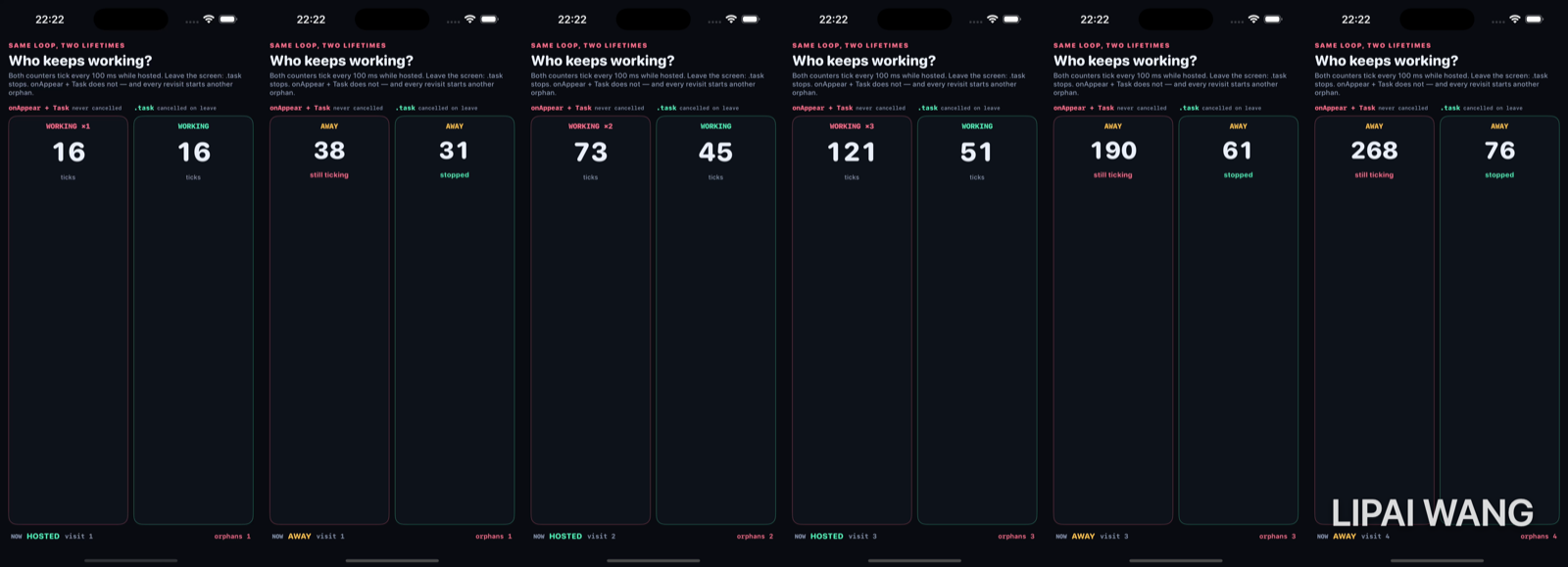
The filmstrip is where the control gets mean. Each revisit starts another rose Task without cancelling the old ones:
| Frame | Phase | Rose | Mint | Orphans |
|---|---|---|---|---|
| 1 | HOSTED visit 1 | 16 | 16 | 1 |
| 2 | AWAY visit 1 | 38 (still ticking) | 31 (stopped) | 1 |
| 3 | HOSTED visit 2 | 73 · WORKING ×2 | 45 | 2 |
| 4 | HOSTED visit 3 | 121 · WORKING ×3 | 51 | 3 |
| 5 | AWAY visit 3 | 190 (still ticking) | 61 (stopped) | 3 |
| 6 | AWAY visit 4 | 268 (still ticking) | 76 (stopped) | 4 |
Four orphans. Rose is ticking four times as fast as a single loop. Mint still has exactly one lifetime per visit — cancel, then a fresh .task(id: visit) on the way back.
Task.cancel() does not yank the thread. It sets a flag. The mint loop notices because Task.sleep throws CancellationError and because the while !Task.isCancelled guard runs between ticks. A while true that never checks — the rose lane — will run until the process dies. Structured concurrency only helps if your code cooperates at suspension points.
Why the sources keep saying "structured"
The Modern Concurrency corpus hammers this for a reason: when work starts inside .task, child suspensions inherit that parent, and navigating away cancels the tree. When work starts as a free-floating Task from onAppear, you have opted into the old world — manual cancel(), or leaks that look like "the battery got worse after we shipped the feed."
This bench does not print to the Xcode console. It prints the leak on the screen, in the same frame as the well-behaved lane.
Mini-exercise
In LeakyLane.onAppear, store the Task in a @State property and call task?.cancel() from .onDisappear. Re-run the away shot. Rose should freeze near mint. Then delete the onDisappear again and watch 41 vs 25 return — that single missing line is the entire bug class.
Challenges
- Replace the tick loop with a real
URLSession.bytesstream. Confirm.taskstops the console noise on leave and the unstructuredTaskkeeps downloading (then fix it). - Use
Task.checkCancellation()instead ofTask.isCancelledand show that a throwing fetch maps cancellation into the same.failedphase from chapter 9. - Start the leaky work with
Task.detachedand photograph whether priority/cancellation inheritance changed anything visible on this bench (spoiler: the orphan count still climbs). - Add a third lane that uses
.taskbut ignores cancellation inside a tight CPU loop with noawait— prove that cooperative cancellation needs a suspension point. - Wire an XCUITest that fails if
orphansis ever greater thanvisitafter an away beat (the invariant this control violates on purpose).
Key Points
.taskcancels when the view leaves the hierarchy;onAppear { Task { } }does not.- Hosted parity: both lanes at 19 ticks on visit 1 — same loop, different lifetime.
- After one leave: rose 41 still ticking, mint 25 stopped — 16 leaked ticks in one away beat.
- Every revisit without cancel starts another orphan: filmstrip ends at orphans 4, 268 vs 76.
- Cancellation is cooperative —
Task.sleep/checkCancellation/isCancelledat suspension points. - Structured concurrency is the hierarchy that makes Back mean stop; unstructured
Taskopts out. - Counters live in the parent so AWAY can still display the numbers after the child views are gone.
- The control is not a slower mint lane — it is a rose lane that refuses to die.
Next up: actors — a counter hammered from many tasks, a plain class racing to the wrong total next to an actor that reaches the right one. The wrong number is the demo.
Read next
Ship your apps faster
When you're ready to publish your Swift app to the App Store, Simple App Shipper handles metadata, screenshots, TestFlight, and submissions — all in one place.
Try Simple App Shipper