You have HTML for structure (Ch 2), CSS for looks (Chs 3-4). The page is beautiful but frozen — clicks don't do anything, forms dump the user on a blank page, nothing updates without a full reload. JavaScript is the third leg: the one that makes the page actually do things.
Every interactive thing on every site is JavaScript. The dropdown that opens, the cart that updates, the infinite scroll, the live search, the "Added to favorites ✓" toast — all JavaScript. It's also what runs Cloudflare Workers (the backend you'll build in Chs 8-14), the build tool that compiles this article (OpenNext + Turbopack), and increasingly even desktop and mobile apps.
This chapter is not "learn JavaScript in 35 minutes." It's the subset of JS you need to be productive on the web — the roughly 20 language features and 10 browser APIs you'll use every day. Everything else you can look up when you hit it.
What JavaScript Is (and Isn't)
JavaScript started in 1995 as a 10-day hack to let websites "do things" (Netscape wanted to compete with Java applets). Despite the name, it's not related to Java — the name was marketing. Today it's the most-used programming language in the world, governed by a formal spec called ECMAScript (so when people say "ES6" or "ES2024," they mean a version of the language).
Key things to know:
- Dynamically typed. You declare a variable; its type is determined at runtime from what you put in it. (TypeScript, Ch 16, adds static types on top.)
- Single-threaded + event-driven. One line runs at a time, but long-running things (network, timers) use callbacks and promises to not block the UI.
- Runs in many places. Originally browser-only. Now: Node.js (servers), Cloudflare Workers (edge), Deno, Bun, React Native (phones), Electron (desktop), Tauri. Same language, different host.
Figure 1 — JavaScript is the language; browsers, Node, Cloudflare Workers, Electron, and React Native are hosts that run it. Same syntax, different APIs per host.
In this chapter we'll focus on browser JavaScript. Workers JS (which you'll write in Ch 8) uses the same language — just different globals (no document, yes fetch + request/response).
Variables — let and const (ignore var)
let count = 0;         // reassignable
const MAX = 100;       // not reassignable

count = count + 1;     // ok
// MAX = 200;          // ERROR: can't reassign a const
Rule of thumb: default to const; use let only when you know you'll reassign. If in doubt, const. You'll see var in old code; it has confusing scoping rules — treat it as legacy.
Types You'll Use Daily
const n = 42;                        // number
const pi = 3.14;                     // number (no separate int/float)
const name = "William";              // string
const big = `Hello, ${name}!`;       // template literal — ${} interpolates
const done = true;                   // boolean (true / false)
const nothing = null;                // intentional absence
const missing = undefined;           // unset value
const list = [1, 2, 3];              // array
const user = { id: 1, name: "W" };   // object
Three quirks to remember:
==vs===. Always use===(strict equality).==does type coercion —"1" == 1is true, which causes bugs. Pretend==doesn't exist.nullvsundefined.nullis "I set this to explicitly empty."undefinedis "never set." Usually treated the same; use== nullor?? fallbackto catch both.typeof arr === "object". Arrays are also objects. UseArray.isArray(x)if you need to tell them apart.
Functions
Two syntaxes — pick either; both work.
// Classic
function greet(name) {
  return `Hello, ${name}!`;
}

// Arrow (shorter, no own `this` — usually what you want)
const greet = (name) => `Hello, ${name}!`;

// Default parameters
const greet = (name = "friend") => `Hello, ${name}!`;

// Destructuring parameters — pull fields out of an object
const createUser = ({ name, age }) => ({ id: Date.now(), name, age });
Functions are first-class — you can pass them as arguments, return them from other functions, store them in variables. This is the foundation of callbacks, promises, and every UI event handler.
Control Flow
if (user.isAdmin) {
  grantAccess();
} else if (user.isPending) {
  waitForApproval();
} else {
  denyAccess();
}

// Ternary — one-line if/else
const label = count > 0 ? "in stock" : "sold out";

// Loops — for-of is almost always what you want
for (const item of cart) {
  total += item.price;
}

// for with index when you need it
for (let i = 0; i < items.length; i++) {
  console.log(i, items[i]);
}
Skip for…in (it iterates over object keys including inherited ones — surprising). Use Object.keys, Object.values, or Object.entries + for…of instead.
Arrays — .map, .filter, .find, .reduce
The four array methods that replace 90% of manual loops. Learn these and your code quality jumps overnight.
const numbers = [1, 2, 3, 4, 5];

// .map — transform each item, return a new array
const doubled = numbers.map(n => n * 2);          // [2, 4, 6, 8, 10]

// .filter — keep only items that match
const evens = numbers.filter(n => n % 2 === 0);   // [2, 4]

// .find — get the first match (or undefined)
const first = numbers.find(n => n > 3);           // 4

// .reduce — collapse into a single value
const sum = numbers.reduce((acc, n) => acc + n, 0); // 15

// Chain them
const sumOfDoubledEvens = numbers
  .filter(n => n % 2 === 0)
  .map(n => n * 2)
  .reduce((acc, n) => acc + n, 0);                // 12
All four return new arrays without modifying the original. This immutable-ish style is what React and most modern frameworks assume.
Objects — Spread, Destructuring, Shorthand
const user = { id: 1, name: "William", email: "w@example.com" };

// Destructuring — pull fields out
const { name, email } = user;

// Spread — clone + override
const updated = { ...user, name: "Claude" };
// → { id: 1, name: "Claude", email: "w@example.com" }

// Shorthand — same property name + variable name
const id = 42, name = "foo";
const item = { id, name };
// → { id: 42, name: "foo" }

// Optional chaining — read nested fields that may not exist
const street = user?.address?.street;  // undefined if any link is missing

// Nullish coalescing — default for null/undefined only
const displayName = user.name ?? "Anonymous";?., ??, and spread (...) are the three newer features that make object code clean. You'll use them constantly.
The DOM — Reading and Changing the Page
In Chapter 2 you saw that the browser parses HTML into a tree. JavaScript reaches into that tree and can read it, change it, or listen for events on it.
// Read elements
const heading = document.querySelector('h1');
const allLinks = document.querySelectorAll('a');   // NodeList (iterable)
const byId = document.getElementById('signup');    // same as #signup selector

// Read/change content
heading.textContent = "Welcome back";
heading.innerHTML = "Welcome <em>back</em>";       // parses as HTML (careful — XSS risk)

// Read/change classes
heading.classList.add('active');
heading.classList.remove('hidden');
heading.classList.toggle('open');

// Read/change attributes
const a = document.querySelector('a');
a.href = '/new-url';
a.setAttribute('data-variant', 'primary');
const variant = a.dataset.variant;                 // 'primary' — reads data-*

// Create new elements
const div = document.createElement('div');
div.textContent = "I'm new here";
document.body.appendChild(div);

// Remove
div.remove();
document.querySelector takes any CSS selector — the same patterns from Ch 3. .btn--primary:hover doesn't work (JS can't see hover state), but structural ones like main article:first-child h2 are fair game.
Events — Making the Page Respond
Every interactive element fires events: clicks, inputs, submits, scrolls, keypresses. You hook into them with addEventListener.
const btn = document.querySelector('.btn--primary');

btn.addEventListener('click', (event) => {
  console.log('Clicked!', event.target);
  event.preventDefault();  // stops default behaviour (e.g. form submit)
});

// Form submit — the big one
const form = document.querySelector('form');
form.addEventListener('submit', (event) => {
  event.preventDefault();  // stop full-page reload
  const formData = new FormData(form);
  const email = formData.get('email');
  console.log('Submitting:', email);
});

// Typing in an input
const input = document.querySelector('input[name=search]');
input.addEventListener('input', (event) => {
  console.log('User typed:', event.target.value);
});Figure 2 — The event lifecycle. User → element → listener callback → DOM mutation → visible change. This is the loop behind every interactive feature.
The events you'll use 90% of the time
| Event | When it fires |
|---|---|
click | Mouse click or touch tap on any element |
submit | <form> submitted (Enter in input, or submit button clicked) |
input | User typed in an <input> / <textarea> (every keystroke) |
change | <input>'s value committed (blur or Enter) |
keydown | Key pressed down (e.g. for keyboard shortcuts) |
load | Page / image / script finished loading |
DOMContentLoaded | HTML parsed — safe to query elements (fires before load) |
scroll | User scrolled (window or a scrollable element) |
Wrap your whole script in a DOMContentLoaded listener (or put <script> at the end of <body>) so the DOM exists before your code runs.
fetch — Talking to Servers
The browser gives you fetch() to make HTTP requests (the request-response loop you saw in Chapter 1). Everything from "load user's avatar" to "submit signup form" goes through fetch.
// GET — read data
const res = await fetch('/api/users/42');
const user = await res.json();  // parse response body as JSON
console.log(user.name);

// POST — send data
const res = await fetch('/api/signup', {
  method: 'POST',
  headers: { 'Content-Type': 'application/json' },
  body: JSON.stringify({ email: 'w@example.com', password: 'hunter2' }),
});
if (!res.ok) {
  throw new Error(`Signup failed: ${res.status}`);
}
const { token } = await res.json();
fetch() returns a Promise — a placeholder for a future value. await unwraps it. We'll cover promises + async next.
Promises and async / await
Network calls, timers, file reads, database queries — none of these finish instantly. JavaScript handles the wait with promises: "here's a token representing a future value; call me back when it's ready."
Three states:
Figure 3 — Every Promise starts pending, then either fulfills with a value or rejects with an error. await suspends until the promise settles; try/catch handles the reject path.
The old callback-hell syntax is dead. Modern JS reads like synchronous code using async and await:
// Define an async function — it automatically returns a Promise
async function loadUser(id) {
  try {
    const res = await fetch(`/api/users/${id}`);
    if (!res.ok) throw new Error(`HTTP ${res.status}`);
    const user = await res.json();
    return user;
  } catch (err) {
    console.error('Failed to load user:', err);
    return null;
  }
}

// Call it
const user = await loadUser(42);
Four rules:
awaitonly works insideasyncfunctions (and at the top level of modules).awaitpauses the function until the promise settles — the rest of the program keeps running.- Wrap
awaitcalls intry/catchto handle rejections. - Use
Promise.all([p1, p2, p3])to run things in parallel when they don't depend on each other.
Modules — Splitting Code Into Files
Modern JavaScript uses ES modules (ESM). Each .js file is a module that can export things and import things from other modules.
// file: utils.js
export function formatPrice(cents) {
  return `$${(cents / 100).toFixed(2)}`;
}
export const TAX_RATE = 0.08;

// file: checkout.js
import { formatPrice, TAX_RATE } from './utils.js';

const priceWithTax = formatPrice(1999 * (1 + TAX_RATE));
In HTML, load them with type="module":
<script type="module" src="/checkout.js"></script>Module scripts automatically defer (don't block HTML parsing) and give you import / export for free.
Putting It Together — A Real Interactive Form
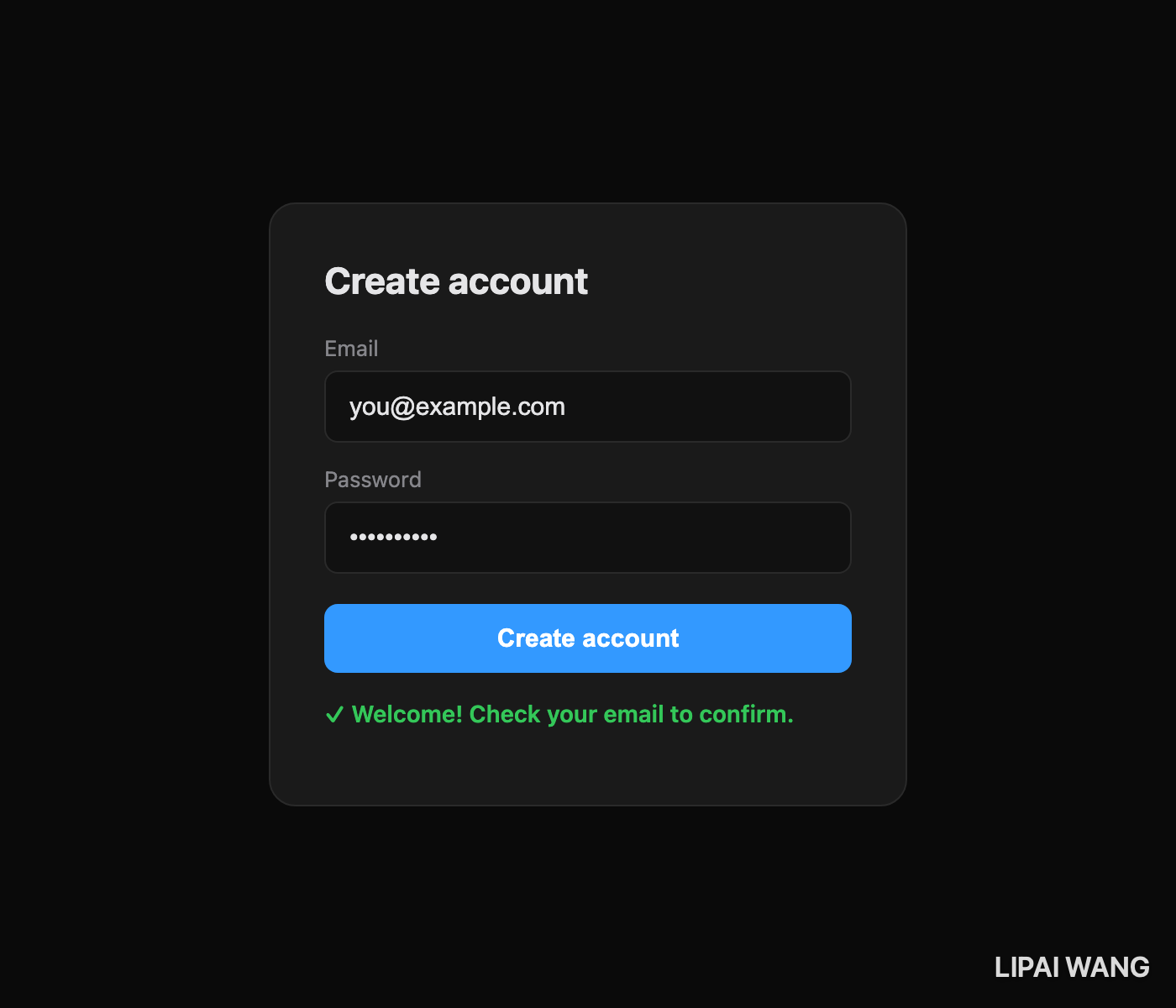
Let's wire up the signup form from Chapter 2 with real JavaScript. This is the complete pattern you'll use for 80% of user interactions:
// file: signup.js
const form = document.querySelector('#signup-form');
const status = document.querySelector('#signup-status');

form.addEventListener('submit', async (event) => {
  event.preventDefault();  // don't reload the page

  // Gather form data
  const data = Object.fromEntries(new FormData(form));

  // Disable the submit button while we work
  const submitBtn = form.querySelector('button[type=submit]');
  submitBtn.disabled = true;
  status.textContent = 'Signing you up…';

  try {
    const res = await fetch('/api/signup', {
      method: 'POST',
      headers: { 'Content-Type': 'application/json' },
      body: JSON.stringify(data),
    });

    if (!res.ok) throw new Error((await res.json()).error || 'Signup failed');

    status.textContent = '✓ Welcome! Check your email to confirm.';
    form.reset();
  } catch (err) {
    status.textContent = `✗ ${err.message}`;
  } finally {
    submitBtn.disabled = false;
  }
});
Look at what's happening: the form is a normal HTML <form> (so it still works if JS fails), the listener intercepts submit, gathers data, fires a fetch, disables the button to prevent double-submit, shows a status message, and re-enables on finish. This is real production JavaScript — every pattern in this file will recur in your career.
localStorage — Remembering Things Across Page Loads
The browser gives every site a tiny key-value store that persists forever (until the user clears it). Perfect for preferences, carts, draft content, theme toggles.
// Write
localStorage.setItem('theme', 'dark');
localStorage.setItem('cart', JSON.stringify(cartItems));

// Read
const theme = localStorage.getItem('theme');         // 'dark' or null
const cart = JSON.parse(localStorage.getItem('cart') ?? '[]');

// Remove
localStorage.removeItem('theme');
localStorage.clear();  // wipes everything for this site
Only stores strings — JSON.stringify + JSON.parse to round-trip objects. Max ~5MB per site in most browsers. Don't put anything sensitive here; it's visible to any script on the page.
Exercise — Persistent Theme Toggle
Take the personal page from Chs 2-4. Create app.js next to it, and link it from <head> with <script type="module" src="app.js" defer></script>. Paste this in:
// app.js — progressive enhancement on top of the static page

// 1. Restore saved theme on first paint (or respect system preference)
const saved = localStorage.getItem('theme');
const systemDark = matchMedia('(prefers-color-scheme: dark)').matches;
document.documentElement.dataset.theme = saved ?? (systemDark ? 'dark' : 'light');

// 2. Hook up the toggle button
const toggle = document.querySelector('#theme-toggle');
toggle?.addEventListener('click', () => {
  const root = document.documentElement;
  const next = root.dataset.theme === 'dark' ? 'light' : 'dark';
  root.dataset.theme = next;
  localStorage.setItem('theme', next);
});

// 3. Pretend-signup form — intercept the submit
const form = document.querySelector('#contact-form');
const status = document.querySelector('#contact-status');
form?.addEventListener('submit', async (event) => {
  event.preventDefault();
  status.textContent = 'Sending…';
  await new Promise(r => setTimeout(r, 800));  // fake network delay
  status.textContent = `✓ Thanks! We'll be in touch.`;
  form.reset();
});
Add a <button id="theme-toggle">Toggle theme</button> to your footer and an id="contact-form" / <span id="contact-status"></span> on the Ch 2 form. Reload. Click the theme button — the page flips, and the choice persists on refresh. Type into the form and submit — no reload, a status message appears. That's every pattern from this chapter in a single file.
Next Steps
You now know the JavaScript that matters: variables, functions, arrays, objects, the DOM, events, fetch, async/await, modules, localStorage. That's the language and the browser APIs for roughly 80% of real frontend work. The rest you'll pick up by following your nose on MDN when you hit a specific problem.
Next:
- Save your enhanced page. It's a real three-file web app now (
.html,.css,.js) using every concept from Part 1. - Open DevTools → Console. Type
document.querySelector('h1').textContent = 'Hello'and watch the heading change. Live-poking the DOM is how you debug and learn. - Read the next chapter — Ch 6: Project Study — Dissecting simpleappshipper.com. We open this website's real source code and walk every pattern. Part 1 of the series ends there; Part 2 (backend + Cloudflare) begins in Ch 7.
Read next
Ship your apps faster
When you're ready to publish your Swift app to the App Store, Simple App Shipper handles metadata, screenshots, TestFlight, and submissions — all in one place.
Try Simple App Shipper